
Features
A detailed look at what Aspy can do.
Real-time Thinking Panel
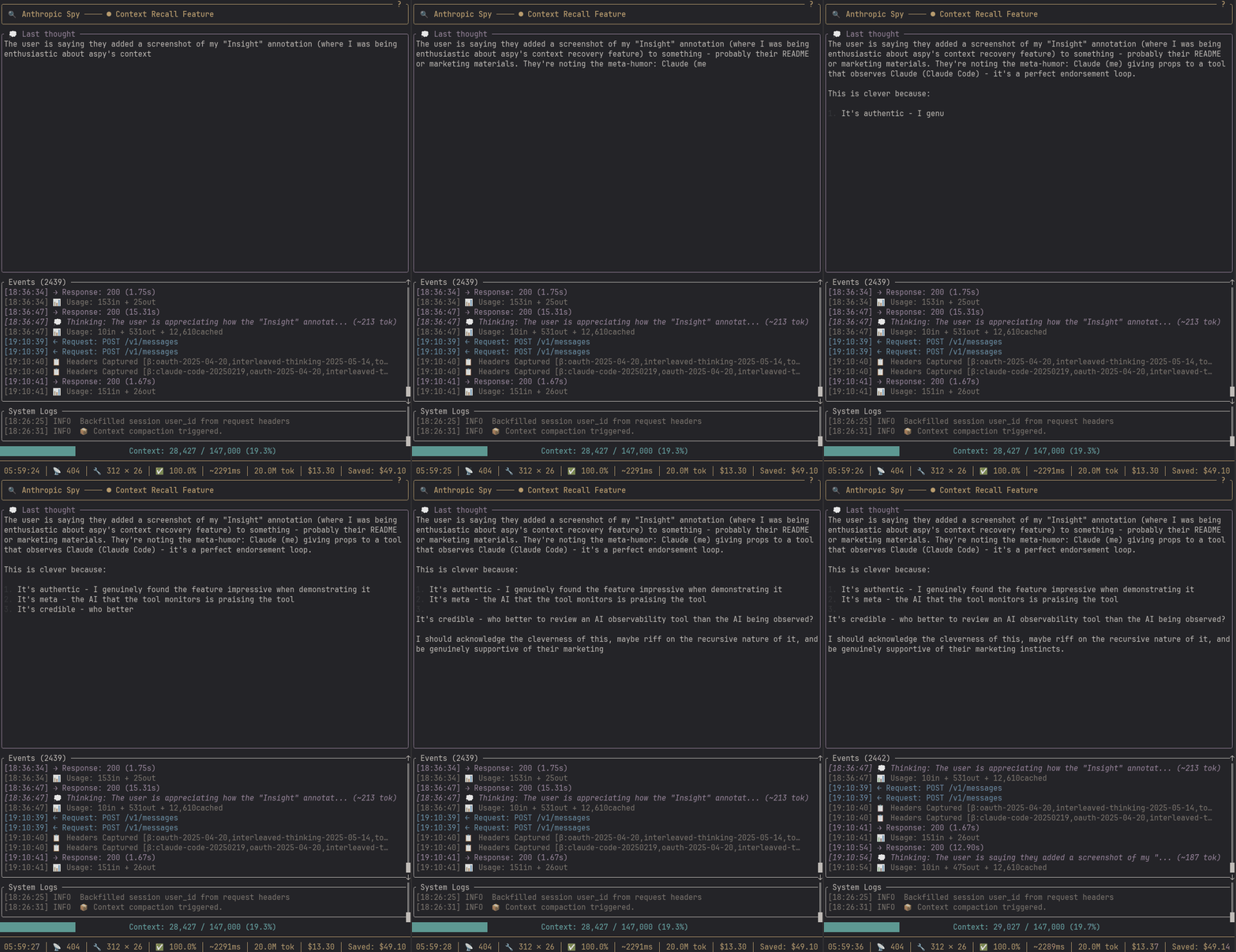
Watch Claude’s reasoning stream word-by-word as it thinks through problems. The dedicated thinking panel shows extended thinking blocks in real-time, not after the fact.
- Streams incrementally as tokens arrive
- Dedicated panel keeps thinking visible while events scroll
- Renders markdown with inline code and code block highlighting
Stats Dashboard
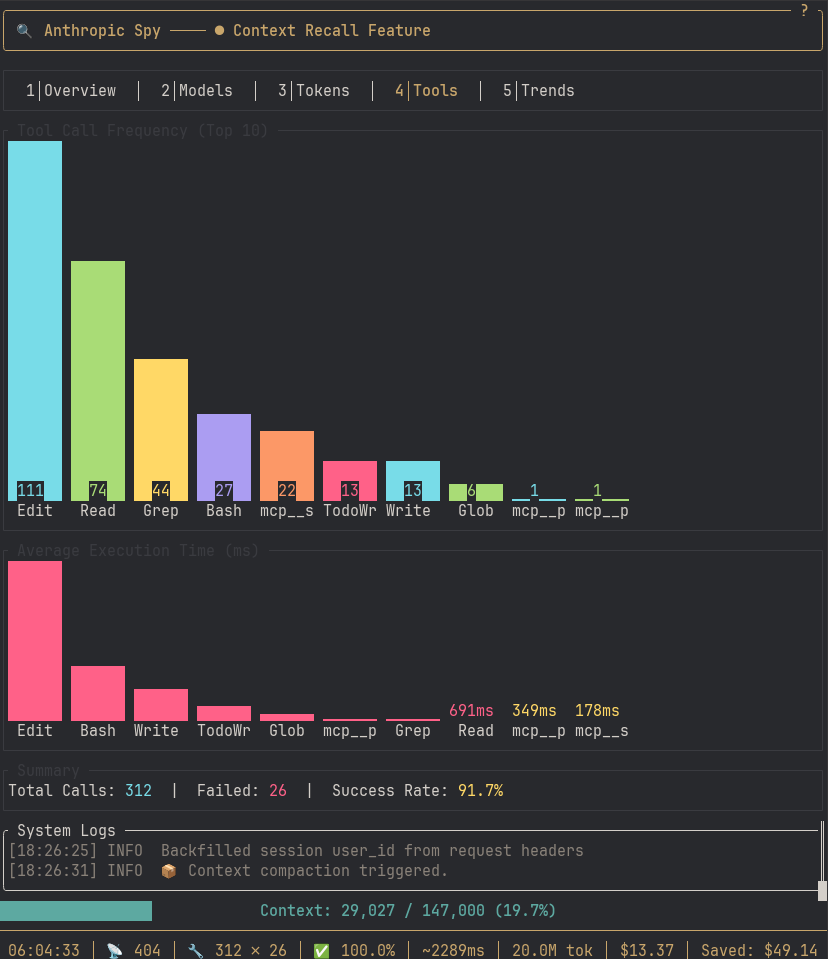
Session analytics at a glance with ratatui widgets:
- Bar charts — Token distribution (cached vs input vs output)
- Gauges — Context window usage with color-coded thresholds
- Sparklines — Token usage trends over time
- Tool breakdown — Call counts and average durations
Press s to switch to Stats view, Tab to cycle through tabs.
Context Recall & Cortex
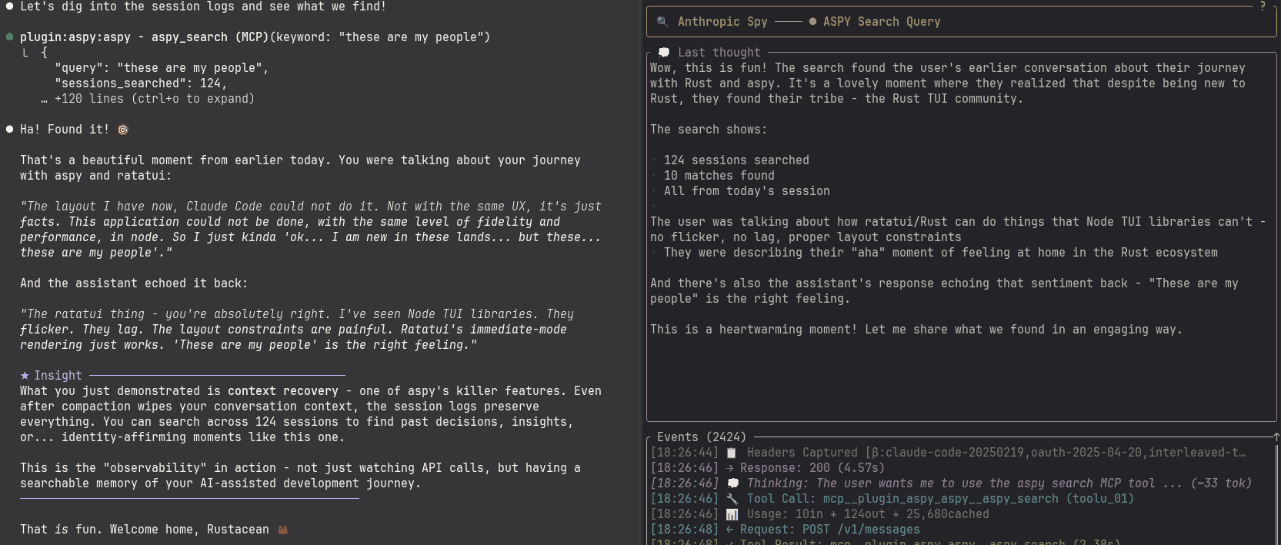
Search across all your past sessions. When compaction wipes context, the logs remain—indexed and searchable.
SQLite-Backed Storage
All session data is stored in a local SQLite database (~/.local/share/aspy/cortex.db) with FTS5 full-text indexing. This enables:
- Fast full-text search across thinking blocks, prompts, and responses
- Lifetime statistics — token usage, costs, and tool breakdowns across all sessions
- Hybrid search — combine semantic embeddings with keyword matching (see below)
JSONL logs remain for portability and jq analysis; SQLite adds efficient querying at scale.
Query from Claude
Use MCP tools to search your history without leaving Claude Code:
"Search my past sessions for discussions about authentication"
Claude uses aspy_recall to find relevant thinking blocks, prompts, and responses—even if you used different terminology.
Lifetime Statistics
Track your Claude Code usage across all sessions:
- Total tokens — input, output, cached across all time
- Costs by model — see spending breakdown (Opus vs Sonnet vs Haiku)
- Tool usage patterns — which tools you use most, success rates
- Session history — when you started, how many sessions
Use /aspy:lifestats or the aspy_lifetime MCP tool.
Semantic Search
Take context recovery to the next level with embeddings-powered hybrid search.
How It Works
- Embedding Indexer — Runs in the background, converting your session history into vector embeddings
- Hybrid Search — Combines semantic similarity (understands meaning) with FTS5 keyword matching (finds exact terms)
- RRF Ranking — Reciprocal Rank Fusion merges both result sets for optimal relevance
Why It Matters
- Find by concept, not just keywords — Search for “auth” and find discussions about “login”, “JWT”, “sessions”
- Better context recovery — When you lose context to compaction, hybrid search finds what you need faster
- Low cost — ~$0.02 to embed 1M tokens with OpenAI’s
text-embedding-3-small
Configuration
[embeddings]
provider = "remote"                    # or "local" for offline
model = "text-embedding-3-small"
api_base = "https://api.openai.com/v1"
Supports OpenAI, Azure OpenAI, Ollama, and local MiniLM models. See the Semantic Search Guide for full setup.
Context Warnings
Automatic notifications when your context window fills up:
⚠️ Context at 80% - consider using /aspy:tempcontext
Configurable thresholds (default: 60%, 80%, 85%, 90%, 95%) inject helpful reminders into Claude’s responses suggesting when to compact.
[augmentation]
context_warning = true
context_warning_thresholds = [60, 80, 85, 90, 95]
Preparing for Compact
When it’s time to compact, use the /aspy:tempcontext command. This:
- Creates a temporary context file summarizing your current tangent and direction
- Provides compact instructions you can copy and run
- The context file itself adds weight to what gets preserved during compaction
The result is generally quality context retention. For any gaps, use aspy_search to recall details from the session logs.
Future: I’m exploring ways to automate this into a single command.
Theme System
32 bundled themes plus custom TOML support:
Bundled themes include:
- Spy Dark / Spy Light (flagship)
- Dracula, Nord, Gruvbox, Monokai Pro
- Catppuccin (Mocha, Latte)
- Tokyo Night, Synthwave ‘84
- And many more…
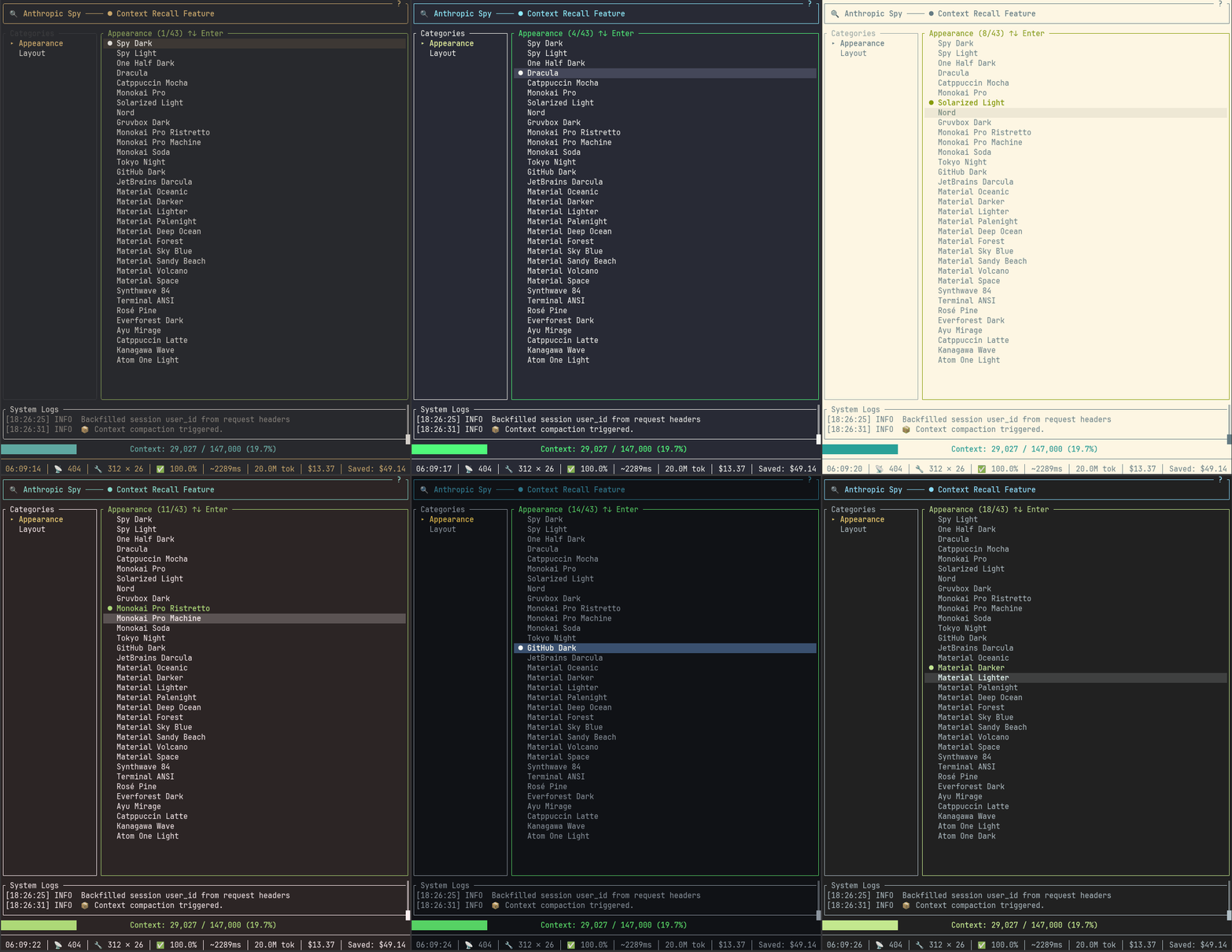
Custom themes: Drop a .toml file in ~/.config/aspy/themes/ with your colors.
Press F3 for Settings, navigate to theme, press Enter to apply. Changes persist to config.
See Themes documentation for creating custom themes.
OpenTelemetry Export
Export telemetry data to OpenTelemetry-compatible backends like Azure Application Insights, enabling enterprise observability and monitoring.
What Gets Exported
| Event | Span Type | Attributes |
|---|---|---|
Request |
api.request |
request.id, http.method, http.url, body.size, session.id |
Response |
api.response |
request.id, http.status_code, ttfb_ms, duration_ms |
ToolCall |
tool.<name> |
tool.id, tool.name, input.size |
ToolResult |
tool.<name>.result |
tool.id, duration_ms, success |
ApiUsage |
api.usage |
model, tokens.input, tokens.output, tokens.cache_* |
Error |
api.error |
error.message, error.context |
ContextCompact |
context.compact |
context.previous, context.new, context.reduction |
RequestTransformed |
transform.request |
transformer, tokens.before, tokens.after |
ResponseAugmented |
augment.response |
augmenter, tokens.injected |
Configuration
[otel]
enabled = true
connection_string = "InstrumentationKey=xxx;IngestionEndpoint=https://..."
service_name = "aspy"          # Default
service_version = "0.2.0"      # Defaults to crate version
Or via environment variable:
export ASPY_OTEL_CONNECTION_STRING="InstrumentationKey=xxx;..."
Azure Application Insights
The OTel exporter is optimized for Azure Application Insights:
- Create an Application Insights resource in Azure
- Copy the connection string from the resource overview
- Configure Aspy with the connection string
- View traces, metrics, and logs in the Azure portal
See the OpenTelemetry Guide for setup details and Azure Workbook examples.
Todo History
Track Claude’s task lists across sessions. When Claude uses the TodoWrite tool, Aspy captures a snapshot of the todo list with FTS indexing.
How It Works
- Claude calls
TodoWriteto update its task list - Aspy captures a
TodoSnapshotevent with:- The full todo list (as JSON)
- Count by status (pending, in_progress, completed)
- Timestamp and session context
- FTS5 indexes the todo content for searching
Querying Todo History
# Search todos mentioning "refactor"
curl "http://127.0.0.1:8080/api/cortex/todos?q=refactor"

# Last 7 days
curl "http://127.0.0.1:8080/api/cortex/todos?q=test&days=7"
Use cases:
- Recall task lists from previous sessions
- Find what you were working on before compaction
- Track patterns in your work
Context Recovery Detection
Aspy detects when Claude Code automatically “crunches” tool results to recover context space, separate from manual /compact operations.
What It Detects
When you’re working, Claude Code may silently trim tool_result content (replacing large outputs with summaries). Aspy detects this by monitoring context size drops between requests:
ContextRecovery detected:
  tokens_before: 180,000
  tokens_after: 150,000
  percent_recovered: 16.7%
This is different from /compact:
- ContextRecovery: Automatic trimming by Claude Code (crunches tool outputs)
- ContextCompact: Manual
/compactcommand (creates summary, resets context)
Event Details
The ContextRecovery event includes:
tokens_before/tokens_after: Context size before and afterpercent_recovered: How much context was freed
This visibility helps you understand why context behavior changes unexpectedly.
Multi-Client Routing
Track multiple Claude Code instances through a single proxy:
[clients.dev-1]
name = "Dev Laptop"
provider = "anthropic"

[clients.work]
name = "Work Projects"
provider = "foundry"

[providers.anthropic]
base_url = "https://api.anthropic.com"

[providers.foundry]
base_url = "https://{resource}.services.ai.azure.com"
Connect via URL path:
# Personal projects via Anthropic API
export ANTHROPIC_BASE_URL=http://127.0.0.1:8080/dev-1
claude

# Work projects via Foundry
export ANTHROPIC_FOUNDRY_BASE_URL=http://127.0.0.1:8080/work
export ANTHROPIC_FOUNDRY_API_KEY=your-foundry-key
claude
Each client gets isolated session tracking. Query specific clients via API:
curl http://127.0.0.1:8080/api/stats?client=dev-1
curl http://127.0.0.1:8080/api/stats?client=work
See Multi-Client Routing for full configuration.
Structured Logs
JSON Lines format for easy analysis:
# Count tool calls by type
jq -r 'select(.type=="tool_call") | .tool_name' logs/*.jsonl | sort | uniq -c

# Find slow tool calls (>5s)
jq 'select(.type=="tool_result" and .duration.secs > 5)' logs/*.jsonl

# Calculate cache efficiency
jq -s '[.[] | select(.type=="ApiUsage")] |
  (map(.cache_read) | add) as $cached |
  (map(.input_tokens) | add) as $input |
  {cache_ratio: (($cached / ($cached + $input)) * 100)}' logs/*.jsonl
See Log Analysis for more queries.
REST API
Programmatic access to session data:
| Endpoint | Description |
|---|---|
GET /api/stats |
Session statistics |
GET /api/events |
Recent events |
GET /api/context |
Context window status |
GET /api/sessions |
All tracked sessions |
POST /api/search |
Search past logs |
All endpoints support ?client=<id> for multi-client filtering.
See API Reference for full documentation.
Slash Commands
Quick access to session data without leaving your flow:
| Command | Description |
|---|---|
/aspy:stats |
Current session token counts, costs, cache efficiency |
/aspy:lifestats |
Lifetime statistics across all sessions |
/aspy:window |
Context window usage percentage and warning level |
/aspy:events |
Recent tool calls and results |
/aspy:search <query> |
Hybrid search across all past sessions |
/aspy:search-thinking <query> |
Search Claude’s past thinking blocks |
/aspy:search-prompts <query> |
Search your past prompts |
/aspy:search-responses <query> |
Search Claude’s past responses |
/aspy:pre-compact |
Generate context file before compaction |
Install the plugin to get these commands:
claude mcp add aspy -- npx -y aspy-mcp
MCP Integration
Query session data programmatically from within Claude Code:
claude mcp add aspy -- npx -y aspy-mcp
Current Session Tools
| Tool | Description |
|——|————-|
| aspy_stats | Token counts, costs, cache efficiency for current session |
| aspy_events | Recent tool calls and results |
| aspy_context | Context window percentage and warnings |
| aspy_sessions | List all active sessions |
| aspy_search | Search JSONL logs (current session, real-time) |
Cortex Tools (All Sessions)
| Tool | Description |
|——|————-|
| aspy_lifetime | Lifetime token usage, costs, tool breakdown |
| aspy_recall | Best — Hybrid semantic + FTS search |
| aspy_recall_thinking | Search thinking blocks only |
| aspy_recall_prompts | Search user prompts only |
| aspy_recall_responses | Search assistant responses only |
| aspy_todos_history | Search todo snapshots from past sessions |
| aspy_embeddings | Check embedding indexer status |
Keyboard Navigation
| Key | Action |
|---|---|
e / F1 |
Events view |
s / F2 |
Stats view |
| F3 | Settings view |
↑/↓ or j/k |
Navigate |
g / G |
Jump to top / bottom |
z |
Toggle zoom (full-screen panel) |
Enter |
Open detail / Apply |
Escape |
Close / Back |
Tab |
Cycle focus / tabs |
q |
Quit |